Pros and Cons Calculator User Guide
The Pros And Cons Calculator allows users to make reasoned choices by entering all the known pros and cons for a decision you are trying to make. For each Pro and Con the user is able to assign a weight that reflects the impact of the that pro or con. Once you have identified all of the Pros and Cons for the decision, clicking on the Calculate Result button will sum up the weighted values of all the pros and cons and determine whether the pros outweigh the cons or vice-versa. Since complex decisions often take a lot of consideration and research, the tool allows you to save the form state and load it at a later time to continue research.
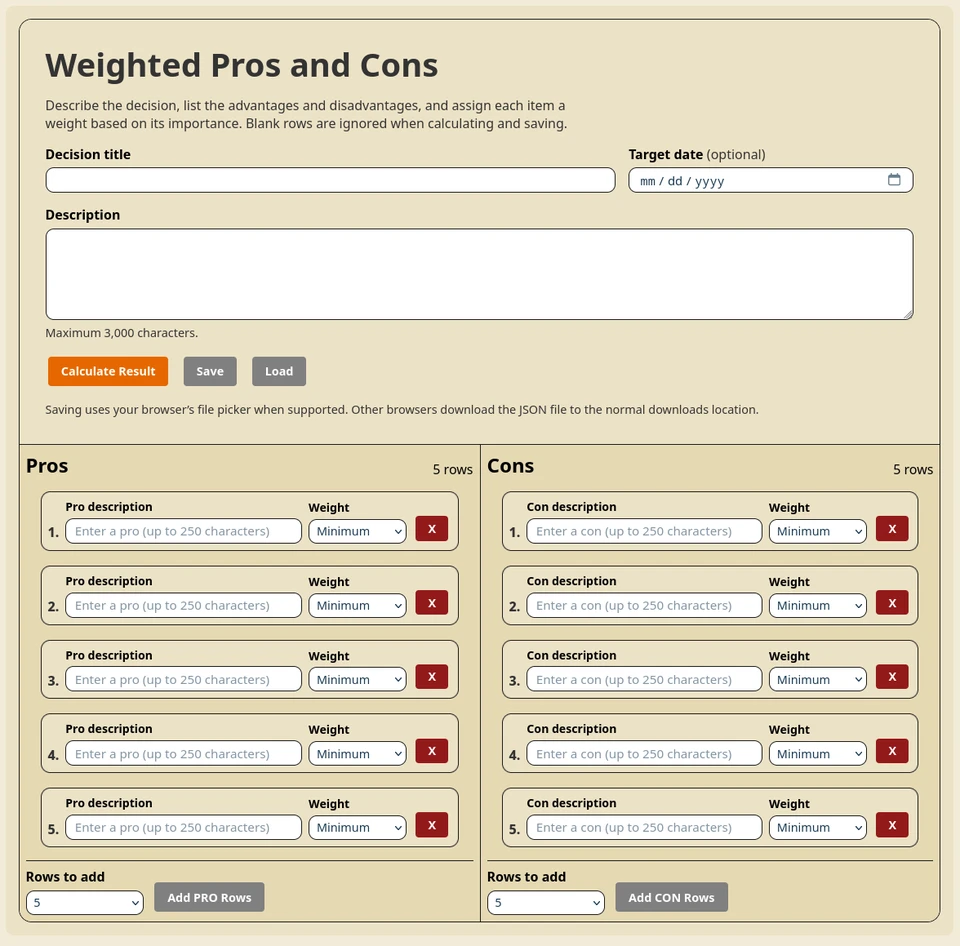
Quick Start
- Enter a Decision title.
- Optionally set a Target Date for the decision to be made.
- Add an optional Description of the decision to be made.
- Fill in Pro and Con rows.
- Choose a Weight for each row.
- Select Calculate Result.
- If you need more rows for Pros or Cons, select the number of rows for each and click the appropriate Add Rows button(s)
Decision Details
- Decision title: allows up to 150 characters.
- Description: allows up to 3,000 characters.
- Target date: Date by which you want the decision to be made.
Working With Pro and Con Rows
- Each side starts with 5 rows.
- Use Rows to add to add 1, 5, 10, or 25 rows at a time.
- Use Add PRO Rows or Add CON Rows to insert new rows.
- Use X to remove a row.
- If only one row remains, removing it clears that row instead of deleting it.
- Each row text is limited to 250 characters.
Using Weights
Every row has a Weight selector with five levels: Minimum, Low, Medium, High, and Maximum. The weights are assigned integer values from 1 to 5 with Pros having Positive integers and Cons having negative integers. Higher weight means that point has more influence on the final result.
Calculate and Interpret Results
- Select Calculate Result at any time.
- The sum of the Pro weights and Con Weights are added together to determine if the Pros have greater weight (values).
- The result panel shows whether pros outweigh cons, cons outweigh pros, or both are equal.
- You also see individual totals for the Pros, Cons, and the Final value.
Save Your Pros And Cons List
- Select the Save button to export your decision as a JSON file.
- On supported browsers, you can choose save location and filename in the browser file picker.
- On other browsers, the file is downloaded to your normal downloads location.
- Blank rows are ignored in the saved output.
Load a Saved Decision
- Select the Load button and choose a previously saved Pros And Cons json file.
- The tool restores title, description, target date, and both lists.
- After loading, the tool shows a message to indicate whether the load succeeded or failed.
Help Dialog
- Select Help to open the quick instructions modal.
- Close it by selecting Close, pressing Escape, or clicking outside the dialog.
Tip: You do not need to fill every row. Only rows with text are counted in calculations and saved files.